The short version
Netflix sells three ad products in Amazon DSP. Only one of them lets you use Amazon's shopping audiences, Run of Network – Amazon Audience Enabled.
Pick either of the other two and Amazon's audiences will not work silently.
There are now two ways to get that one product: attach a ready-made "always-on" deal if your account shows one, with no minimum spend, or request it yourself in a couple of minutes as before. Same product either way. The ready-made deals are only just appearing, with no official announcement, and not every account has them yet.
- Best for
- Advertisers who already run Amazon DSP and want Netflix reach with Amazon's shopping, streaming and browsing signals deciding who sees it. Brand and upper funnel briefs measured on reach and video completion.
- Not for
- Anyone who needs Netflix's own audience data, viewing moods, interests or genre targeting. Anyone who needs a guaranteed number of impressions, a price agreed in advance, or the first ad in the break. All of those sit on products this guide does not cover.
What works
- Amazon's own audiences, which no other way of buying Netflix gives you
- If a ready-made deal is showing for your market you can attach it with no minimum spend and no request step
- You request the deal yourself and Netflix answers in minutes, with no account team involved
- The same starting price as Netflix's own targeting product, without the surcharge that product adds
- Eleven markets from one seat, each priced in its own currency
- Reach and frequency reporting built in, and one frequency cap shared across Netflix, Prime Video, Roku and the rest of streaming
What needs your attention
- Netflix's audiences, interests, viewing moods and genre targeting are not available at all on this product
- Amazon's own genre exclusion is switched off here too, so you cannot include a genre or exclude one
- The deal has to sit alone on its own ad group, so it cannot share a budget with your other streaming
- Creative cannot run for up to 72 hours while Netflix reviews it
- Private auction only, so no guaranteed volume and no agreed price. Delivery moves week to week by design
- The ready-made deals are rolling out quietly, so most markets still need the request form, and the US ready-made deal is not the Amazon-audience one
Netflix launched an ad tier in November 2022 at $6.99 a month and spent two years being hard to buy.[10] That is over. The ad tier passed 250 million monthly active users by the May 2026 upfront, up from 70 million in 2024 and 94 million in 2025,[6] and since Q4 2025 you can buy it directly in Amazon DSP.[3] It runs in eleven markets today, the United States, Canada, the United Kingdom, France, Germany, Spain, Italy, Mexico, Brazil, Japan and Australia, with fifteen more, among them Ireland, the Netherlands, Sweden, Switzerland and Poland, due through 2027.[11]
Every major streaming platform is now buyable through Amazon's advertising system, giving advertisers a single place to buy across all of them. Amazon audiences are the reason to buy Netflix here rather than in The Trade Desk or DV360. In March 2026 Amazon let its own segments, built from what people shop for, browse and stream, target Netflix inventory, starting in the US in Q2 2026.[5] And they are easy to lose by accident, in the first thirty seconds of setting the deal up.
This guide covers the version you can run yourself: a private auction Run of Network – Amazon Audience Enabled deal, built as a normal Streaming TV campaign. You get it one of two ways, attach a ready-made "always-on" one if your account shows it, or request it in a couple of minutes, and everything after the setup is identical. It does not cover programmatic guaranteed. That is a recommendation rather than something we left out, and the section after next explains why.
Three products, and you cannot change your mind once it is running
Netflix offers three ad products when you request a deal on Amazon Interface and 2 look similar, be careful.
What each product actually gives you
| Capability | RON – Amazon Audience Enabled | RON – Netflix Targeting Only | Top 10 – Netflix Targeting Only |
|---|---|---|---|
| Inventory | Full run of network | Full run of network | Top 10 titles only |
| Amazon first party audiences | Yes | No | No |
| Amazon custom audiences (beta) | Yes | No | No |
| Netflix audiences, interests, viewing moods | No | Yes Proposal Deal, No Default Deals | Yes Proposal Deal, No Default Deals |
| Genre targeting | No | No | Yes Proposal Deal, No Default Deals |
| Age, gender and demo from Netflix | No | Yes Proposal Deal, No Default Deals | Yes Proposal Deal, No Default Deals |
| Location, device, time of day | Yes | Yes | Yes |
| Position in the ad break (first, middle, last) | Yes | Yes | Yes |
| Sensitive content blocks | Yes | Yes | Yes |
| Frequency caps | Yes | Yes | Yes |
Capabilities as documented by Amazon and Netflix for DSP advertisers. On the Amazon Audience Enabled product, location, device and time of day can be set either on the deal or in Amazon DSP. On the other two they are set on the deal.
The first two rows are the whole decision. Netflix Targeting Only means Netflix does the targeting. Amazon Audience Enabled means Amazon does it. Top 10 uses Netflix targeting as well, and simply limits your ads to the ten most watched titles. It is useful when the brief is about being next to whatever everyone is watching that week.
If Amazon DSP is only one of your providers, pick the first column. Netflix's own audience data is available in The Trade Desk and DV360 as well. Amazon's audiences are not available anywhere else. So a Netflix Targeting Only deal bought in Amazon DSP is a deal you could have bought in any DSP, with an extra step in the way.
The interface wont block you from choosing something It wont run
Say you request a Netflix Targeting Only deal, and later, on the ad group in Amazon DSP, you add Amazon audiences anyway. Nothing stops you. There is no error, and the campaign shows as live.
Your Amazon audiences are then applied on top of the targeting Netflix is already applying. Two sets of filters run against the same viewers and wont run. Nothing in the interface tells you that is the reason.
Amazon's rule is short: never put Netflix targeting and Amazon targeting on the same deal. If Amazon audiences are in the plan, ask for an Amazon Audience Enabled deal from the start. You cannot switch a deal over later.
Use a private auction deal, don't wait for a guaranteed one
You can buy a Netflix deal two ways: private auction or programmatic guaranteed. Guaranteed has a low 1% tech fee and suits a large committed buy. For everyone else it is the wrong choice, for three reasons.
- You cannot set any targeting in Amazon DSP. On a guaranteed deal the targeting controls in the Amazon DSP interface do not apply. Audiences, locations, devices and times of day are all agreed with Netflix and written into the deal itself. Amazon audiences only work on private auction deals, so a guaranteed deal cannot use them.
- You cannot set it up yourself. The deal request form in Amazon DSP only creates private auction deals. A guaranteed deal means an account team, a negotiation and a spend commitment.
- Your frequency cap is not enforced. On a guaranteed deal Amazon counts impressions against your cap but does not act on it, because Netflix is controlling delivery to hit the number it guaranteed you.
For most people, private auction is the right choice today. You give up a guaranteed number of impressions and a price agreed in advance. In return you keep the targeting that made you choose Amazon DSP in the first place.
Netflix said it would offer always-on deals with no minimum spend and no commitment, and those have started to appear. Ready-made Netflix deals now show up in Inventory Hub for some advertisers, ready to attach without requesting anything and with no minimum to clear. There has been no official announcement and they are not in every account yet, so treat them as a shortcut when they are there and fall back to the request form when they are not. Either way you are buying the same private auction product.
If what you need is a programmatic guaranteed deal, or a custom one built around your brief, we can put you in front of the right team at Amazon. Email us or book a call and we will make the introduction.
The ready-made deals, and which ones let you use Amazon audiences
About 80 ready-made Netflix deals now appear across eleven markets, each in its own currency. Most are Netflix own audiences targeting deals; only around 20% are the Amazon Audience Enabled kind this guide is about. If the ready-made deal for your market is not one of those, request an Amazon Audience Enabled deal instead. We show how under Requesting a deal. Telling them apart is easy: the name contains "_Amazon Audience Enabled_".
These may not be showing for you yet
The ready-made deals are rolling out quietly, with no announcement. If you do not see one for your market, nothing is wrong, request the deal with the proposal form instead. The steps are the same and the floor price is about the same.
Proposal deals
What you can target, and where you set it
The same setting often appears twice, once on the Netflix side of the deal and once in Amazon DSP. Usually only one of the two actually works, and choosing the wrong one is the most common reason a Netflix campaign does not spend. Here is where each setting is set on Run of Network – Amazon Audience Enabled.
| Setting | Where it's set |
|---|---|
| Amazon audiences | In Amazon DSP, on the ad group. In market, lifestyle and interest, life event, demographic |
| Amazon custom audiences | In Amazon DSP, on the ad group. |
| Location, device, time of day | Either side. Easiest in Amazon Ad group |
| Sensitive content blocks | On the deal, with Netflix. Netflix may require them on this product |
| Position in the ad break | On the deal interface. Not available in Amazon Ad group. |
| Netflix audiences, interests, viewing moods | Not available on this product |
| Genre targeting or exclusion | Not available on this product, on either side. See below |
| Your own customer lists | Uploaded to Netflix through LiveRamp or Netflix Direct and used through the deal ID. Never in Amazon interface. |
Product capabilities as documented by Amazon and Netflix for DSP advertisers.
Two of those rows need more explanation.
You lose Netflix genre control completely. Amazon added a interface in the DSP that removes up to five genres from a Netflix deal, under Content then Genres on the ad group: action, comedy, drama, fantasy, horror, romance, science fiction, sports, thriller and untagged. Here does not work on deals with Amazon audiences enabled. So on this product, Run of Network – Amazon Audience Enabled, you cannot choose a genre and you cannot exclude one either. If the brief needs genre control, it cannot also have Amazon audiences, Run of Network – Amazon Audience Enabled is not suitable here.
Your own customer data does not go into Amazon DSP. Your lists have to be sent to Netflix through LiveRamp or Netflix Direct, and you reach them through the deal ID. You cannot upload a customer list into Amazon DSP and point it at Netflix.
When you build the audience, keep it wide. Use broad lifestyle and in market segments and join them with OR rather than AND. There is only so much streaming inventory, and every extra condition is another way for your bid to miss.
What it costs, and the minimum to get in
Netflix does not publish a rate card, so every public number is an estimate. The most useful one puts Netflix CPMs at about 141% of the average for traditional streaming in Q1 2026, so roughly 41% above the market. The same analysis says that is because Netflix shows few enough ads to keep impressions scarce.[8] That is useful for planning, but it is not a price.
What you get back when you request a deal is a floor price, which is the lowest bid Netflix will accept. It is not what you will pay. In a private auction you win at more than the floor, which is why the setup steps below tell you to bid at or above it and then cap the average you end up paying.
At the same creative length a ready-made deal comes in within roughly 3% of requesting one. What actually differs is the minimum: a proposal deal has to clear a market minimum, and a ready-made always-on deal has none. If one is showing for your market and a few percent on the floor is not the issue, the ready-made deal is the easier place to start. Ready-made deals also stop at thirty seconds, so anything longer is a proposal deal, and reviewing the proposal option is important to guess how much a different creative size will impact the ready-made deals.
Proposal deals price analysis
Six things change the price of a proposal deal.
Changes the price
- Country. By far the biggest factor. Every market has its own price in its own currency.
- Maximum creative length. A fixed percentage of the thirty second price, the same in every market and on every product.
- Which product. Top 10 costs more. The two run of network products cost exactly the same.
- Netflix audience targeting. Adds a flat percentage. You cannot switch it on here anyway.
- Genre targeting. A smaller percentage on top of that one. Also not available here.
- Sensitive theme exclusions. The smallest increase. One exclusion costs the same as all seven.
Does not change the price
- Where your ad sits in the break. First ad and later ads cost the same.
- Your budget. Same price at the minimum and at double it.
- Device. TV, desktop and mobile all cost the same. Only the audience size changes.
- Month or season. No change across any window we tested.
- How many audience values you pick. One age bracket costs the same as nine viewing moods.
Measured by requesting deals one change at a time against a fixed baseline, July 2026.
Two of those lines are the cost argument for the product this guide recommends. The two run of network products cost exactly the same. Only Top 10 costs more. So you are not paying for the product, you are paying for the targeting you switch on. Netflix's targeting adds a percentage to the price. Amazon's audiences sit on your ad group and add nothing.
Same inventory, same starting price, and the extra you would pay on the Netflix Targeting Only product is one you cannot switch on here anyway.
Signed in readers only
Netflix floor prices
Every price measured in ten markets, plus Spain extrapolated from its thirty second rate: floor CPMs for all seven creative lengths in each market's own currency, with the minimum budget, how much more Top 10 costs and what each targeting option adds. We assign every account an Amazon DSP seat if you don't have one.
Free, and it takes a minute. We assign every account an Amazon DSP seat if you don't have one, and these prices are read out of it.
Getting an Amazon Audience Enabled deal onto your account
Two ways in. If a ready-made Amazon Audience Enabled deal is showing for your market and you do not mind the small price difference, add it to your ad group and skip to building the campaign. If it is not, request one with the steps below. The deal you end up with is the same either way.
Everything from here is one product
The rest of this guide builds a single thing: Run of Network – Amazon Audience Enabled, bought as a private auction deal, requested as a proposal. The clicks are much the same for the other two products, but the targeting rules are not, so do not follow these steps with a Netflix Targeting Only deal in front of you.
You request the deal yourself in Amazon DSP and Netflix answers in around two minutes. Do two things before you start. Check the localised ad restrictions policy for your category, because it changes a lot from country to country.[9] If you are in a restricted category, which includes alcohol, gambling, financial services, healthcare and dating, get certified first. Certification is per market, it does not expire, and you cannot request a deal without it. Amazon suggests doing it two weeks ahead.
Then activate your seat. Netflix reads the seat ID from advertiser settings, which is the right place for almost every Netflix deal. Manager account seat IDs are there for advertisers running deals across several sub brands, and parent seat IDs do not work with Netflix at all.
Go to Amazon DSP, Inventory Hub, Proposals tab, New Deal Proposal. Then fill in seven fields:
| Deal name | Your own, up to 255 characters |
|---|---|
| Budget | Must clear the Netflix minimum for that market and product |
| Maximum creative length | :10, :15, :20, :30, :45, :60 or :75. One value per deal, and it sets the price |
| Deal type | Private auction, the default |
| Flight dates | Start and end, inside Netflix's accepted window |
| Time zone | Defaults to your entity's |
| Frequency management | Optional, by profile, device or household |
Deal proposal fields as documented by Amazon and Netflix for DSP advertisers.
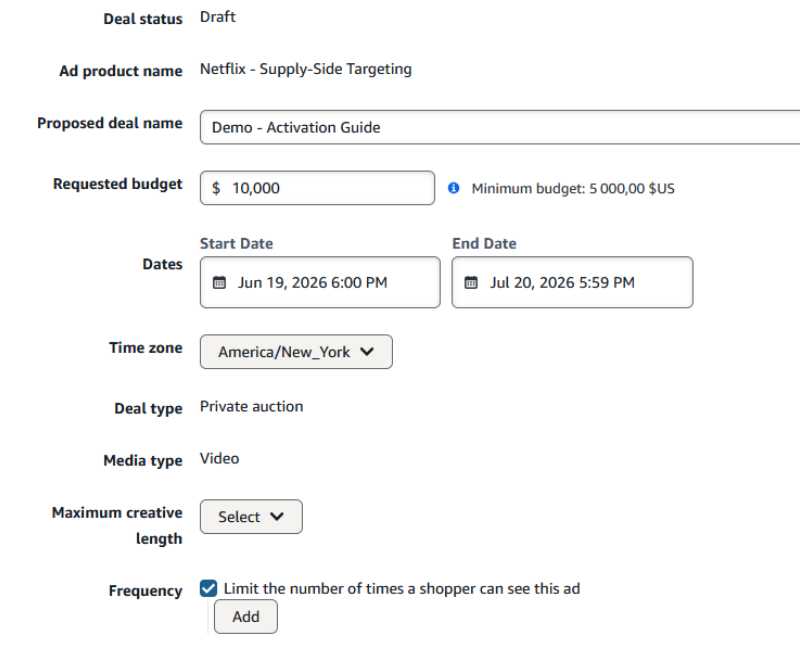
The field is called maximum creative length, and the number you pick sets the price. Set it to your ad's length, as a higher maximum only costs more. So each deal carries one length, and a campaign running a thirty and a fifteen is two deals, two ad groups and two budgets. Decide your lengths before you start.
Submit it, and Netflix reviews it in around two minutes. You cannot edit the deal while it is being reviewed, but you can change it once an answer comes back or if Netflix declines. After around two minutes the status changes on the page, you accept or decline, and an accepted deal shows up in Inventory Hub under the Discovery tab. That is when you can add it to your campaign's ad group.
Building the campaign around the deal
Still the Amazon Audience Enabled deal. This is a normal Streaming TV campaign with a specific list of things switched off.
The campaign
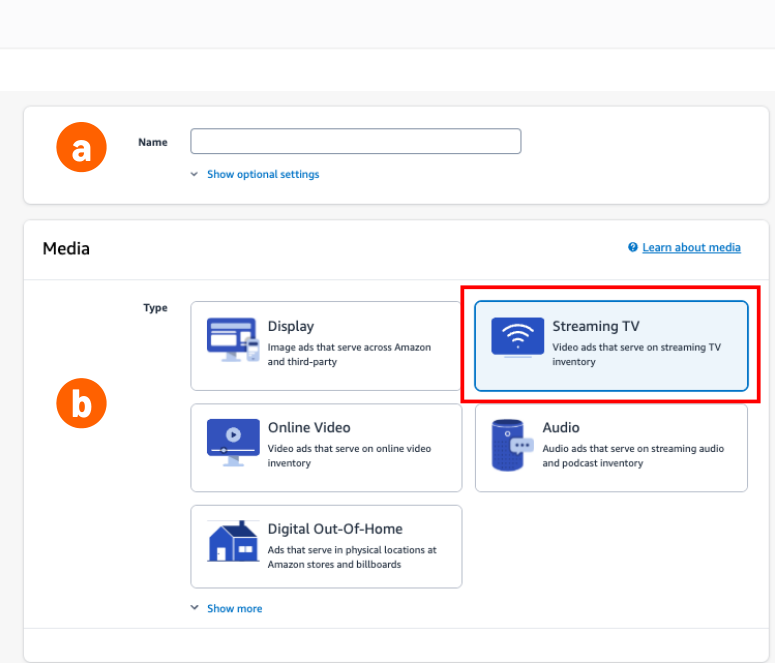
Create the campaign under your advertiser, name it, and set the media type to Streaming TV. Keep Netflix in its own campaign, separate from other inventory. The reach and frequency reporting depends on it.
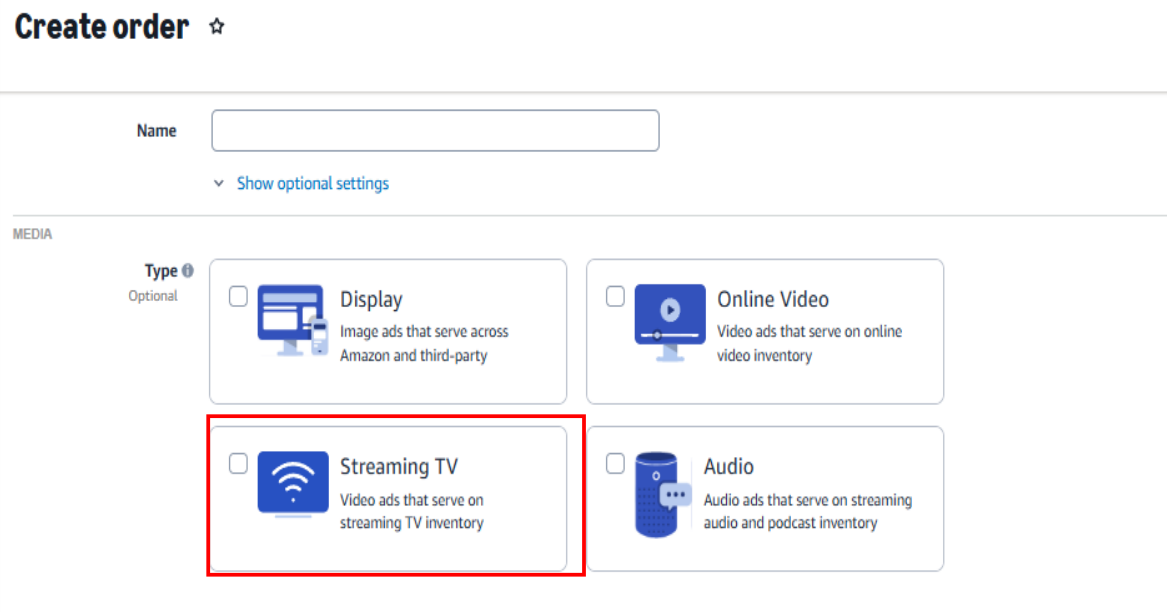
Then set the advertiser domain. It is easy to miss and it matters. It tells sellers who is bidding, and it copies whatever is on the advertiser settings page, which is often amazon.com. The wrong domain causes deals not to match, stops you being kept apart from competitors, and cuts delivery. Type the brand's own domain, with no https and no www.
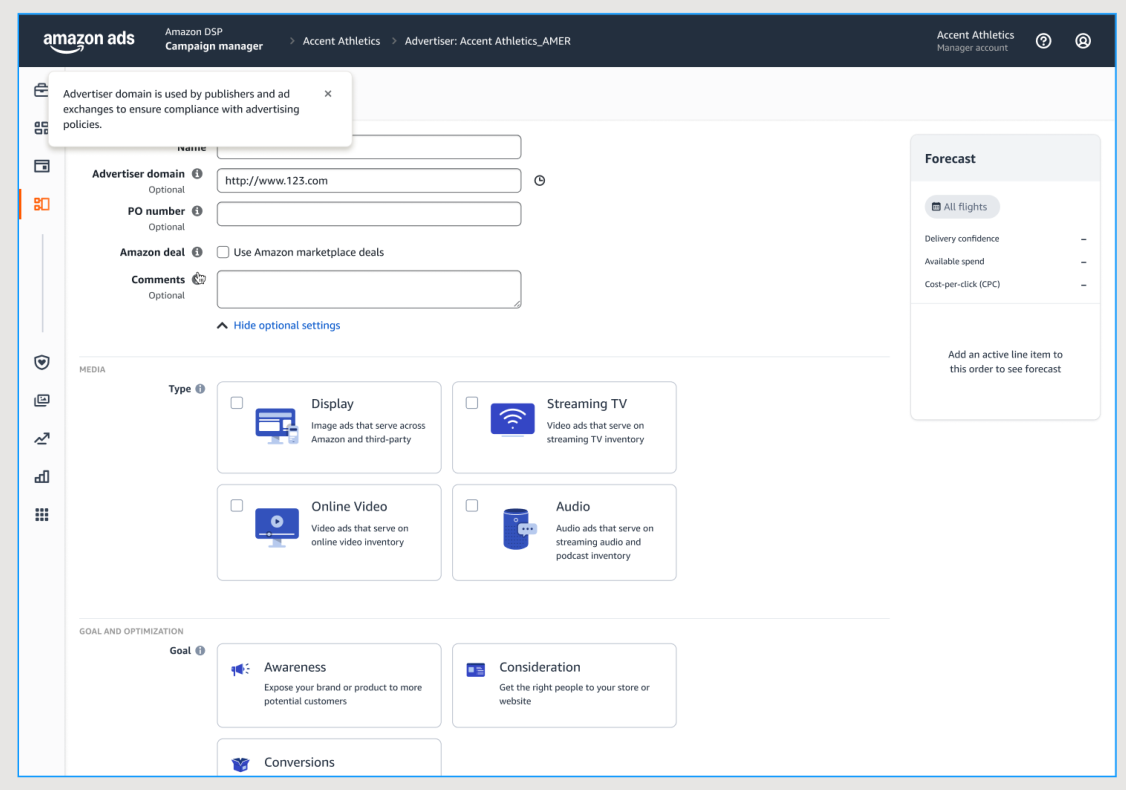
Next the goal and the KPI. Awareness goes with reach. Consideration goes with cost per video completion or video completion rate.
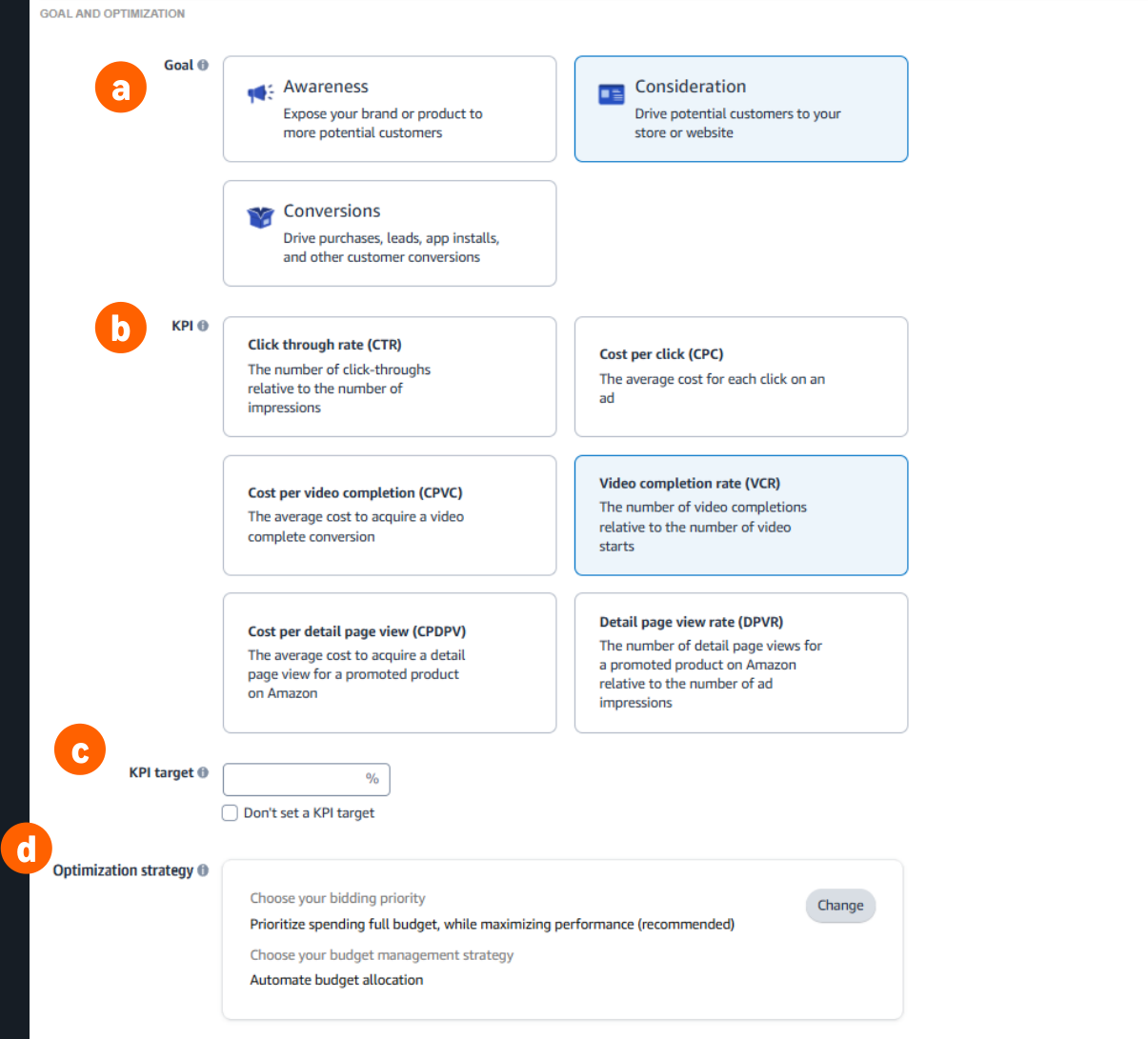
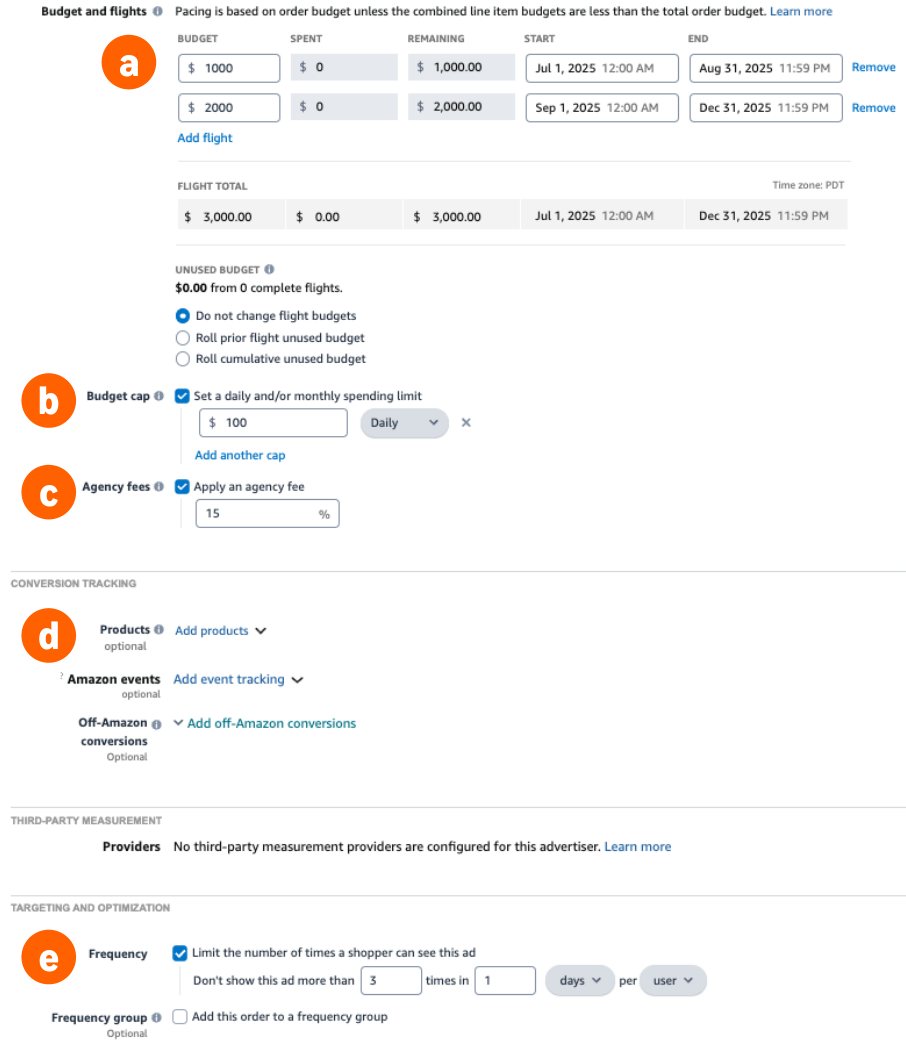
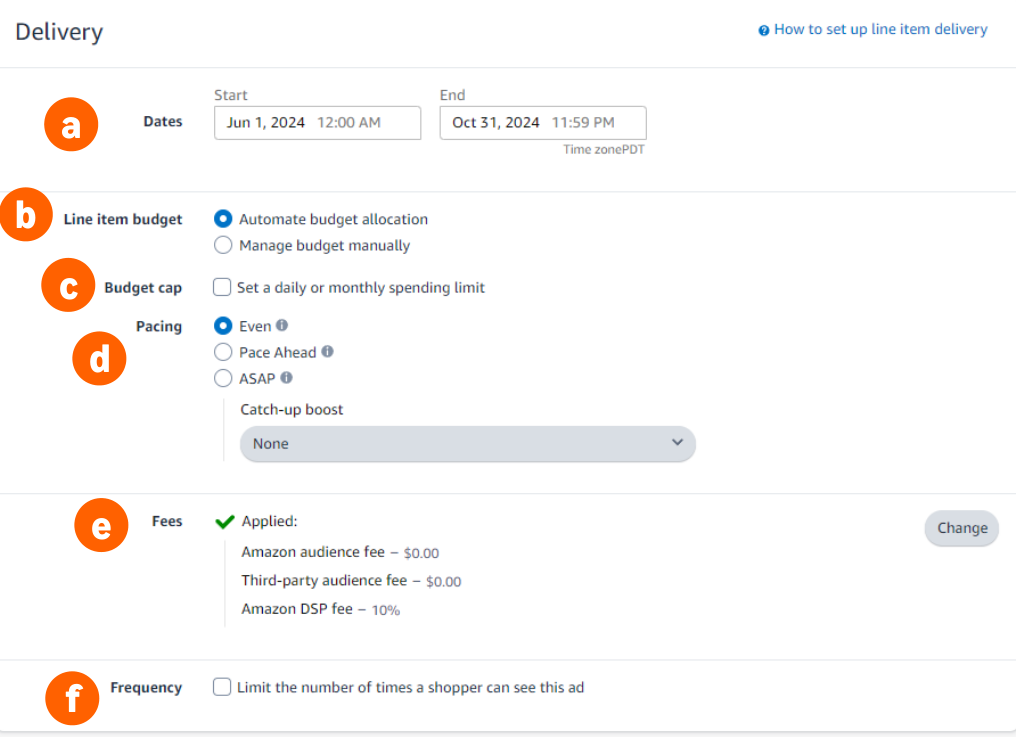
Then budget and dates. The budget has to cover every fee: the media itself, the Amazon DSP fee and any agency fee. Set the agency fee now. Conversion tracking does not work with Netflix, and a tight budget cap on the campaign early on will hold delivery back.
The ad group
Create the ad group and pick the type that matches the deal's media type.
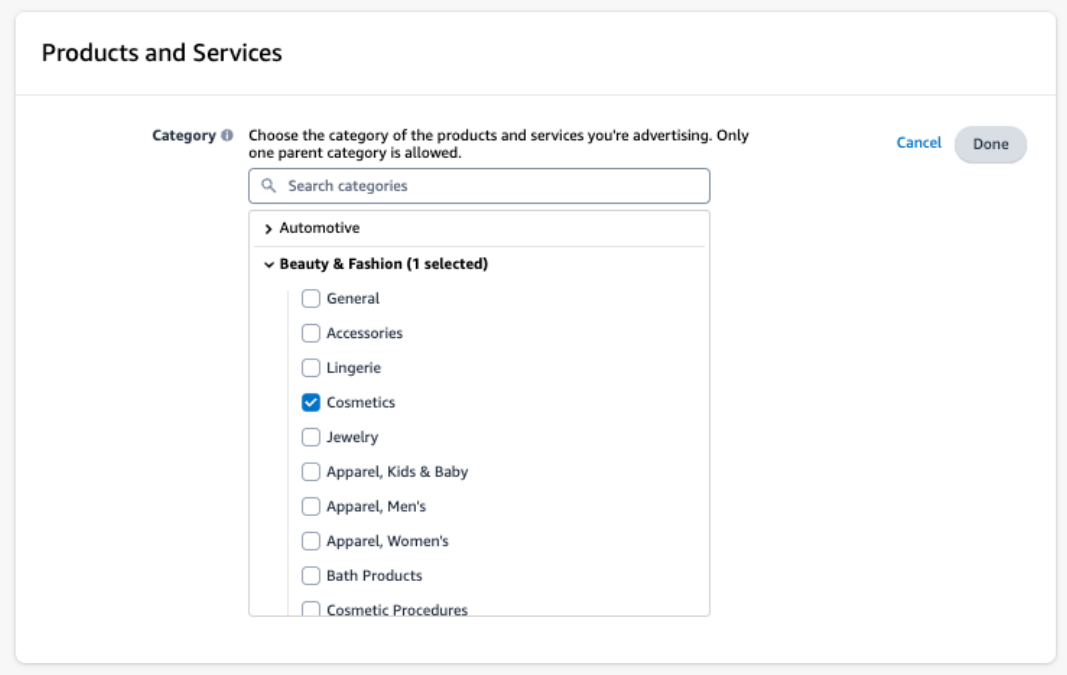
Product category: pick one, and never more than three. Without a valid category the ad group does not bid. Sensitive categories also reduce where your ad can run.
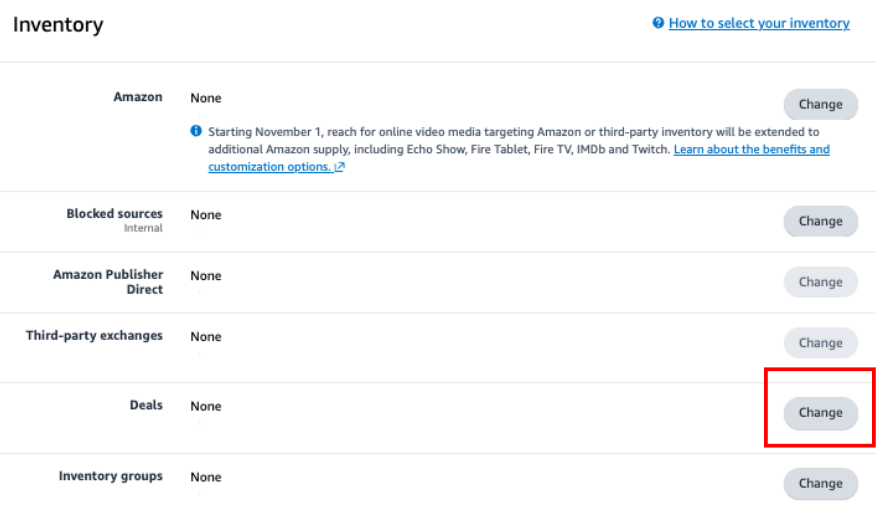
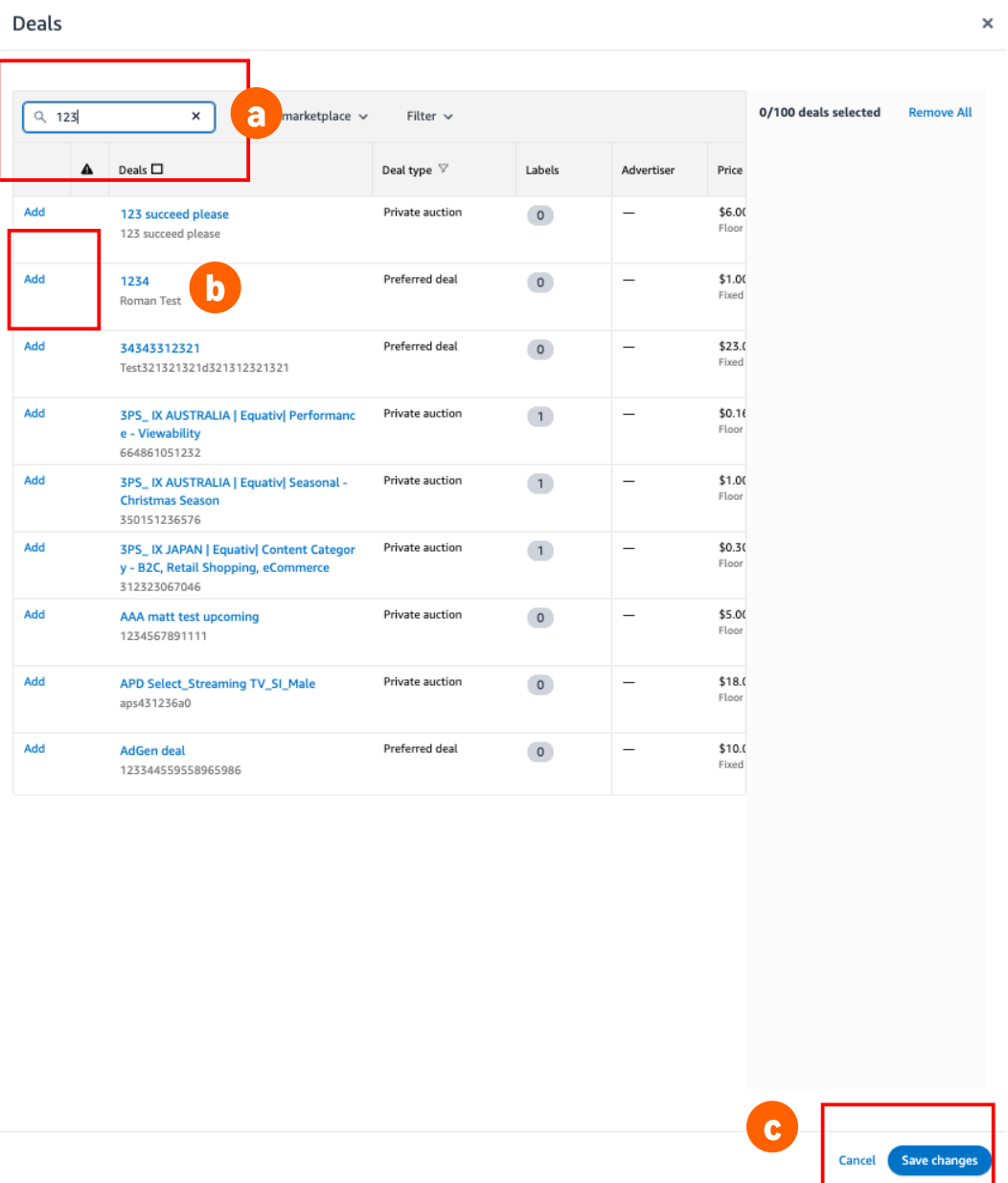
Now the important part. Remove all inventory, then click Change next to Deals and look for your Netflix deal. Search by deal ID, not by name.
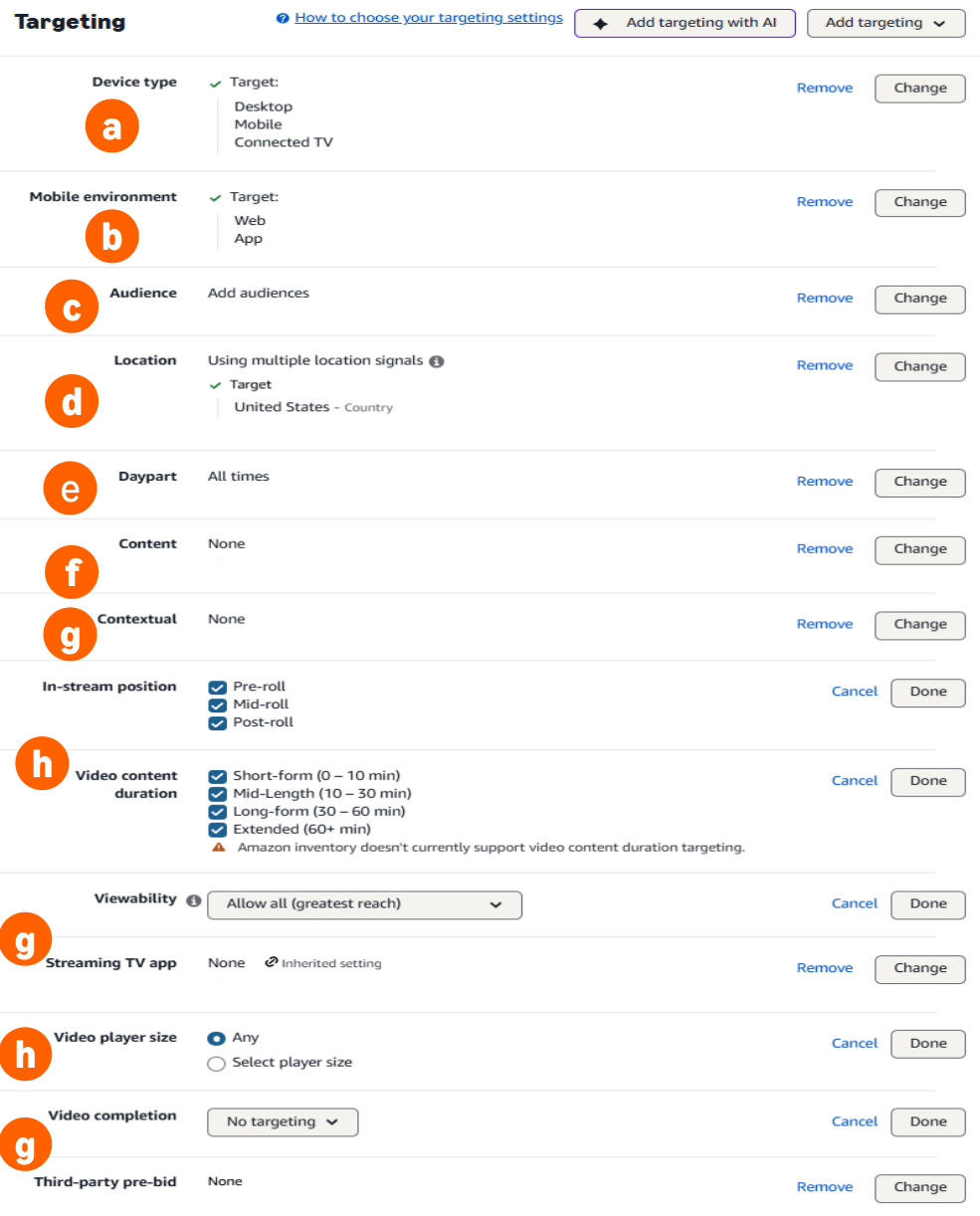
Then targeting, which is mostly about leaving things alone. Tick every device type. Nearly all streaming happens on the TV anyway, so narrowing it down to TV only loses you reach and gains you nothing. Set your locations, and the time of day if you need it. Everything below that stays off.
Audiences are the exception, and where you set them depends on the market. In the US and Canada you add your Amazon audiences here, on the ad group, which on this product is the whole point. Everywhere else Amazon says to leave audiences off the ad group and set them on the deal instead. Either way, keep the segments broad and join them with OR rather than AND.
Set the dates to match the deal dates. Dates that do not match are one of the most common reasons an ad group does not spend.
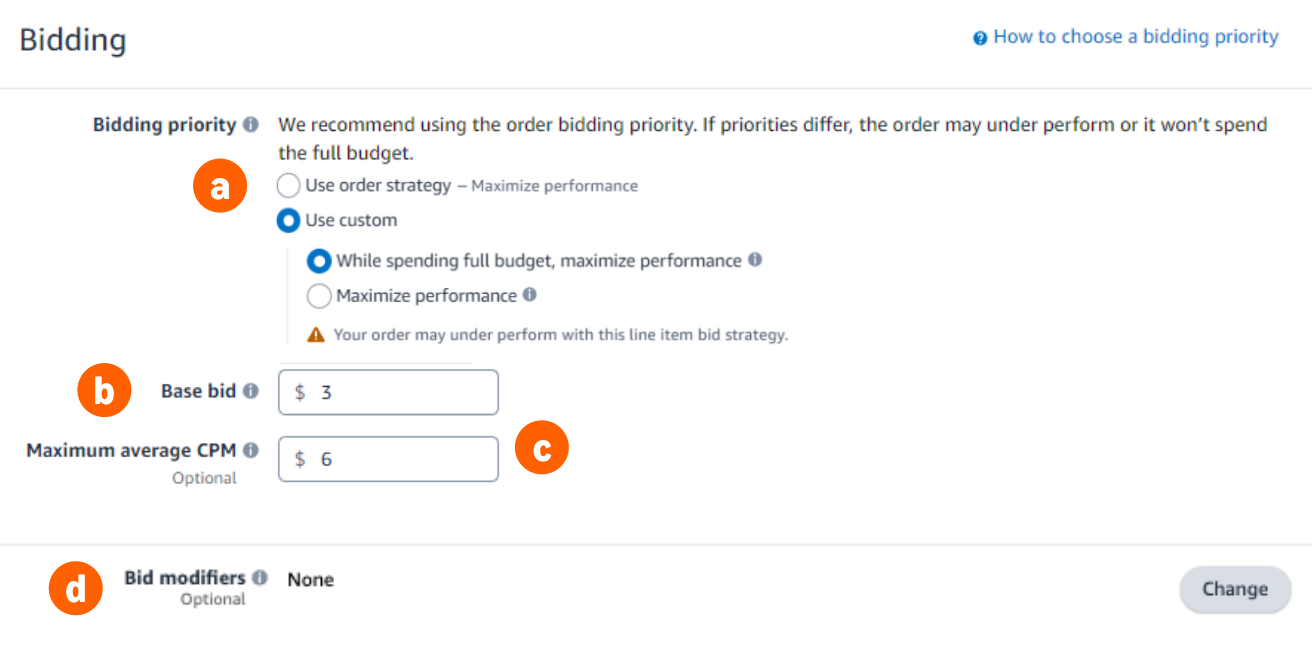
Finally the bid. Set the base bid at or above the deal's floor price, and outside the US add about 0.10 in local currency so a small exchange rate move cannot drop you under the floor. Then set a maximum average CPM: the average price you are happy to end up paying. Amazon aims for that average, so some impressions cost more and some cost less. Leave it blank and Amazon decides for you.
Leave these switched off
Contextual targeting, viewability, Streaming TV app blocking, video completion rate and third party pre bid segments all have controls in Amazon DSP. Against Netflix they do nothing useful and they cut your delivery. Leave in stream position, video content duration and player size at their defaults too. If you want your ad first in the break, that is set on the deal interface, not here.
Video creative, and the three day wait
Attach a video creative to an ad group that carries a Netflix deal, and every creative on that ad group is sent to Netflix to be checked. They all move to Approved with Exceptions, which sounds like a warning but works as a block: they cannot run on Netflix until Netflix answers. That takes up to seventy two hours.
If Netflix accepts, the creative moves to Approved. If Netflix rejects it, the message you get is generic and the real reason has to come from your account contact. Amazon's documentation shows a rejected creative under two different labels, Approved with Exceptions and Not approved, so do not look for one exact wording.
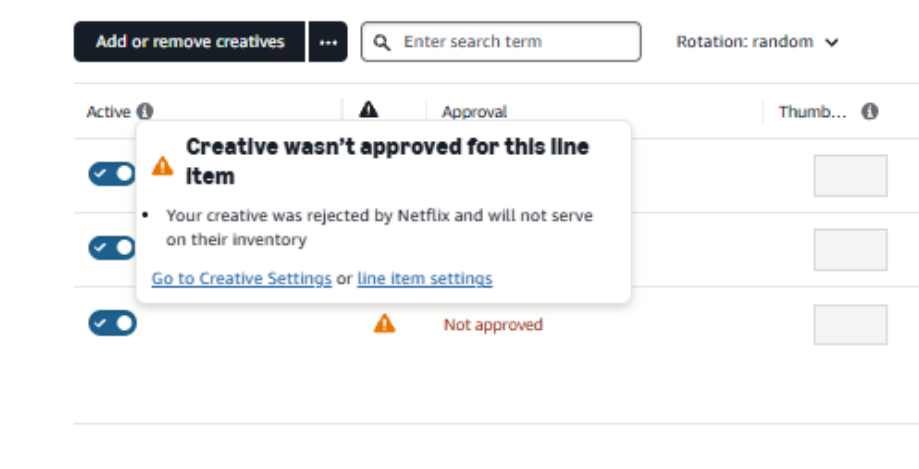
So creative is an up to three day job, not a launch day one. Have it uploaded and attached at least seventy two hours before the campaign is due to start.
Netflix will not give you a live mock up or preview before approval, so build the creative without expecting a proof of how it renders.
What Amazon DSP accepts for video on this kind of deal:
- Ads of up to seventy five seconds, and no longer than the maximum length set on the deal.
- No QR codes, no interactive video and no dynamic creative optimisation. All refused here, whatever you may have read about Netflix elsewhere. Pause ads are a separate buy, covered below.
- Ad serving: Innovid and CM360 are approved.
- Measurement pixels: IAS and DoubleVerify are allowed. Any other pixel blocks delivery rather than simply being ignored, so treat this as a delivery setting, not a measurement one.
- VAST rotations work, but every creative in a rotation has to be the same length. Split your tags by length.
Two policy limits sit on top of the creative check. Political ads are not allowed. Restricted categories, alcohol, dating, entertainment and pharma, need a one time certification at the brand level before you can advertise, and a creative can still hit a country specific review after that. Netflix's rules are its own and differ from Amazon Prime Video's, so a creative cleared on Prime Video is not automatically cleared here.[11]
Pause ads
Netflix opened pause ads to programmatic buying as an open beta on 28 September 2026, built to run alongside your programmatic video.
- Buying model: private marketplace deals only, not guaranteed. These are manual deals agreed directly with Netflix, not the ready made or automated deals covered above. We can help you set up the agreement.
- How the ad works: when a viewer pauses and stays inactive for five seconds, a full screen pause ad appears. It disappears as soon as viewing resumes.
- Better together: Netflix reports stronger results when video and pause ads run together, from upper funnel measures such as ad recall to lower funnel ones such as purchase intent and brand recommendation.
- Creative format: a transparent PNG or a JPEG, ideally between 1728×1440 and 2592×2160. The minimum is 1728×1440.
- Creative process: Netflix reviews the asset, builds a pause ad mock up for you to approve, then traffics the campaign and checks its quality.
- Lead time: about ten business days from Netflix receiving your assets to going live.
- Interactive features: QR codes and other interactive features are not available at programmatic launch.
What breaks delivery
Netflix campaigns usually fail the same way: everything shows as active and nothing spends. Check these in order, most common first.
- Targeting set in the wrong place. Audience, genre, contextual or brand safety settings applied in Amazon DSP against a deal that already carries Netflix targeting. Check this first.
- Creative still waiting, or rejected. A rejected creative has to be uploaded again as a new creative. You cannot fix it in place.
- The wrong deal on the ad group, or dates that do not match the deal's dates.
- The product category. An invalid selection stops bidding without looking as though it has.
- A tighter frequency cap than you meant. Netflix applies its own caps of one an hour, three a day and fourteen a week, per creative and per brand, and yours only replaces those when it is stricter. Amazon's cap now covers Netflix, Prime Video, Roku and other streaming publishers together, so a cap you set for a different publisher can limit Netflix too.
- Other inventory on the same ad group. The Netflix deal has to be on its own.
- Netflix mixed into a campaign with other inventory. Reach and frequency reporting depends on Netflix having its own campaign, separate from non Netflix. This is a measurement requirement, and a different tier from the ad group rule above.
Delivery moving up and down in the first couple of days is normal. Private auction volume varies, and that is how it is meant to work. Watch the first 48 to 72 hours, adjust your audiences and bids based on what you see, and do not report it as a problem.
What you can and cannot measure
You get four numbers: impressions, spend, video completion, and Netflix reach and frequency. There is no conversion tracking, no click tracking, no pixel and no path to conversion. We don't recommend pitching this on sales or cost per acquisition. For outcomes, run a third party study, Kantar, Lucid, Polk or VideoAmp, through Netflix.[11]
Netflix is not in Amazon Marketing Cloud, so there is no cross channel overlap or path analysis that includes it. Its reach and frequency is modelled, not deterministic, the same for every Netflix partner rather than an Amazon limit. Amazon says this will change.
Title level reporting, which show or film you ran against, is not in the Amazon Interface. It is a custom request through Netflix, and only for larger partnerships.
You also cannot retarget people who saw your Netflix ad, or build an audience from that exposure to use anywhere else. Netflix is working on it. Today the impression is a dead end for follow up.
Who this suits, and who should not
Buy it if you already run Amazon DSP and want Netflix reach with Amazon's shopping signals deciding who sees it. If your brief is reach, awareness or video completion. If you want one frequency cap across Netflix and the rest of your streaming. Or if you want to try Netflix without committing a budget up front or negotiating with anyone.
Do not buy this product if the brief needs Netflix's own audience data, viewing moods, interests or genre control. Those are real and they are on the other two products. If you need a guaranteed number of impressions, a price agreed in advance, or the first ad in the break, you need a programmatic guaranteed deal and an account team, which this guide does not cover. This is also run of network only, so if the brief needs a Netflix live event or a specific piece of programming, that is not buyable through Amazon DSP yet.
If the brief needs both Amazon audiences and Netflix genre control, it cannot have both on one deal. The only way to do it today is two deals on two ad groups, and that is worth pricing before you promise it.
VICTOR.AD turns your brief into a ready to run Amazon DSP media plan and the pitch to win the client, then publishes the campaign for you, setting every small option that decides whether it delivers. And you do not have to run it alone once it is live. Managing the performance, and what to do next, is exactly what our consultancy is for. If you want the wider picture on how the streaming platforms fit together, we cover that in how to advertise on Netflix, Spotify and Roku, and what Amazon DSP charges you in is Amazon DSP pricing actually fair.
Plan a campaign that includes Netflix
Build a complete Amazon DSP media plan with streaming allocation, audiences and creative requirements in minutes. Free to start.
Common questions
Can you buy Netflix ads through Amazon DSP?
Yes. Amazon Ads and Netflix announced the integration on 10 September 2025, live from Q4 2025 across the United States, United Kingdom, France, Spain, Mexico, Canada, Japan, Brazil, Italy, Germany and Australia. Amazon audience targeting on Netflix inventory followed, announced in March 2026 and starting in the US in Q2 2026.
What is the difference between the three Netflix ad products in Amazon DSP?
Run of Network – Amazon Audience Enabled gives you all of Netflix's ad supported inventory with Amazon's own audiences applied in Amazon DSP, and very little Netflix targeting. Run of Network – Netflix Targeting Only gives you the same inventory, but the targeting is Netflix's own and is set when you request the deal. Top 10 – Netflix Targeting Only limits your ads to Netflix's ten most watched titles. You are choosing whose audience data does the work, and that choice is fixed at the deal, not at the ad group.
Do I need a Netflix contact or an upfront commitment?
Not for a private auction deal. You request the deal yourself in Amazon DSP and Netflix answers in minutes. Some markets now also show ready-made 'always-on' deals you can attach without requesting anything and with no minimum spend, though these are rolling out quietly and are not in every account yet. Programmatic guaranteed is the one that needs an account team, and it also removes every targeting control from Amazon DSP, so most people should stay on private auction.
Can I just attach a Netflix deal without requesting one?
Sometimes, now. Ready-made 'always-on' Netflix deals have started appearing in Amazon DSP for some advertisers, with no minimum spend, so you attach one to your ad group and skip the request step. They are rolling out without an official announcement, only about 20% of them let you use Amazon audiences, and the US ready-made deal is not one of them. If you don't see a qualifying deal for your market, request it with the form; the product and the floor price are about the same.
Can I use Amazon audiences on any Netflix deal?
No, and this is the most expensive mistake on the page. Amazon audiences only work on a deal that was created as Amazon Audience Enabled. Add them to a Netflix Targeting Only deal and they are applied on top of Netflix's own targeting, so very few people match both and the campaign underdelivers.
What creative lengths does Netflix accept?
Each deal carries a maximum creative length, chosen from ten, fifteen, twenty, thirty, forty five, sixty and seventy five seconds. Seventy five is the highest available. The number you pick sets the price and there is no reason to set it above the length of your ad, so in practice each deal carries one length and a campaign running two lengths needs two deals.
How long does creative approval take?
Up to seventy two hours. Every creative on an ad group that carries a Netflix deal is sent to Netflix to be checked, and sits at Approved with Exceptions until Netflix answers, which means it cannot run on Netflix in the meantime. Have your creative ready at least three days before the campaign starts.
What reporting do I get on a Netflix campaign in Amazon DSP?
Impressions, spend and video completion, plus Netflix reach and frequency: unique household reach, unique user reach, average frequency and how that frequency is spread. It is built into Amazon DSP with no third party tag and no extra cost. It only measures, it does not change how the campaign delivers.
Can I measure conversions from a Netflix campaign in Amazon DSP?
No. There is no conversion tracking, click tracking, pixel or path to conversion for Netflix in Amazon DSP. You get impressions, spend, video completion and reach and frequency. For outcomes, use a third party study such as Kantar, Lucid, Polk or VideoAmp, arranged through Netflix. Treat this as an upper funnel buy, not one you price on sales or cost per acquisition.
Can I retarget people who saw my Netflix ad?
No. You cannot build an audience from Netflix exposure and re message it on Amazon inventory, third party inventory or display. Netflix is developing retargeting, but it is not available today, so a Netflix impression is reach rather than the top of a funnel you can follow up.
Is Netflix data available in Amazon Marketing Cloud?
Not yet. Netflix impressions do not flow into AMC, so there is no cross channel overlap or path analysis that includes Netflix. Its reach and frequency is modelled rather than deterministic, which is the same across all Netflix partners. Amazon says a fix is in development.
Can I run political or restricted category ads on Netflix?
Political ads are not allowed. Restricted categories, alcohol, dating, entertainment and pharma, need a one time brand level certification before you advertise, and individual creatives can still face country specific reviews after that. Netflix's rules are its own and differ from Amazon Prime Video's.
Sources and method
This page separates two kinds of claim. The setup steps, what each product can and cannot do, the targeting rules and the creative policy all come from Amazon and Netflix's own documentation for DSP advertisers. The market roadmap and the platform limits also draw on Amazon and Netflix's July 2026 webinar, which is their statement of intent and may change. The prices are our analysis, from July 2026. How we run these measurements, why the figures are floors rather than what you would actually pay, and why each market is quoted in its own currency, is set out in How we measure.
- [1] VICTOR.AD — Floor prices, market coverage and minimum budgets, from deals we requested from Netflix through Amazon DSP (our own, measured 17 July 2026, on one account and one set of dates)
- [2] VICTOR.AD — What changes the floor price and what does not, measured one change at a time against a fixed baseline (our own, same set of measurements)
- [3] Netflix — The Amazon Ads partnership, announced 10 September 2025, live from Q4 2025 in eleven named markets
- [4] Amazon Ads — The same announcement from Amazon's side, with the country list and Q4 2025 availability
- [5] AdExchanger — Amazon audiences reaching Netflix inventory, announced 4 March 2026, US first from Q2 2026 (trade press, reporting the announcement)
- [6] Engadget — 250 million monthly active users on the Netflix ad tier, announced at the May 2026 upfront, against 70 million in 2024 and 94 million in 2025
- [7] Amazon Ads and Netflix — The setup steps, what each of the three ad products can and cannot do, the targeting rules, how frequency capping behaves, creative approval, delivery advice, and every interface screenshot on this page (documentation issued to Amazon DSP advertisers, July 2026 revision. Their account of their own product, not our measurement)
- [8] Tinuiti — Netflix CPMs running at roughly 141% of the traditional streaming average in Q1 2026, and close to half of non live Netflix inventory being bought programmatically (agency benchmark)
- [9] Netflix Help Center — The localised advertising restrictions policy and the categories that require pre approval
- [10] CNBC — The ad tier launching in November 2022 at $6.99 a month in the United States
- [11] Amazon Ads and Netflix — The market roadmap through 2027, and the platform limits on measurement, conversion tracking, AMC, retargeting, title level reporting, creative formats and restricted categories (July 2026 Netflix on Amazon DSP webinar, questions and answers. Their account of their own roadmap and product, and subject to change)